Unblock downloaded files with PowerShell

Marco Franssen
2 min read•353 words
Loading...
Marco Franssen
Have you ever got in the situation that you downloaded a zip-file and figured out to late the files are blocked? So you extracted the zip file into a folder with existing items. It will be damn hard to figure out which files needs to be unblocked. Besides that it will cost you many work to do so by right-clicking all of the files and clicking the unblock button.
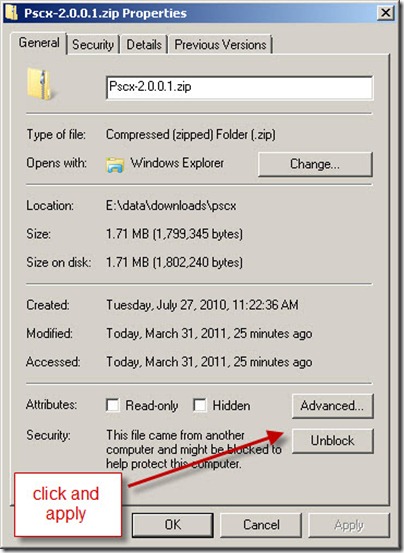
Luckily we have PowerShell and we can easily write a little script to execute the unblock operation on the files in a specific directory. So start by opening PowerShell and key in the following command.
gci 'c:Somefolder' | Unblock-File -WhatIfThe above command will unblock all the Child Items in the given directory. The WhatIf parameter will actually not execute it really, but it will show you what the script is going to do. To really execute the action you have to remove the parameter.
gci 'c:Somefolder' | Unblock-FileAs you may have seen when using the WhatIf parameter, only the files in this folder will be unblocked. What if you want to unblock the files in the sub folders. This can easily be done with the Recurse parameter on your path.
gci 'c:Somefolder' -Recurse | Unblock-File -WhatIfBecause I used the WhatIf parameter again I can pre-check what the command actually is going to do. When I'm sure I want to do it I can just remove the WhatIf parameter again and run the script against the files.
gci 'c:Somefolder' -Recurse | Unblock-FileSo now you wont have to worry about files being blocked just execute the script and you're ready to go. Bookmark this article to easily access the commands when you need them and share it with your friends to make their lives also a little easier. Oh and don't forget to have a look at the 'PowerShell Getting Started Guide' for more information on using PowerShell.

Marco Franssen
Knockout JS is a JavaScript library for creating MVVM JavaScript libraries. In a previous post I already showed some of the cool features of Knockout. http://marcofranssen.nl/knockout-that-cascading-dropdown/ If you want to spike your knowledge on Knockout a little more first, please visit Knockout's documentation. In this article I want to zoom in on the Knockout mapping plugin. The Knockout mapping plugin enables you to easy map your JSON object into an observable JavaScript object. So here…
Marco Franssen
When developing Windows Phone apps I love to use the theme accent colors in my apps. Since there are some new theme colors in Windows Phone 8 I started searching for their color codes. Lucky me I found them on msdn "Theme for Windows Phone"). Now you may be thinking how to use the colors in your own Windows Phone apps. The Color object doesn't contain a color called Emerald. So I created a small class to help me out with this issue. First of all I created a small static helper method to convert…
Marco Franssen
This is the fourth time I installed Windows 8. This time I installed it on my personal notebook instead of a VHD, because Windows 8 is finally ready to market. So I started with downloading the enterprise edition from my MSDN subscription. Unfortunately my USB drive died so I had no storage large enough to put the image on and boot from. So I started thinking to install it over the network. Luckily me I still had my rusty 10 year old 256MB USB drive which perfectly fits a Windows PE image. So I…

Marco Franssen
When building a big web application with ASP.NET MVC 3 I ran into a problem to secure my web application in a maintainable way. There are lots of examples with attributes, but this isn't maintainable. So I started searching for other solutions, however most of the information is leaning on those un-maintainable attributes I finally found "Fluent Security". What does Fluent Security offer you? Fluent Security provides a fluent interface for configuring security in ASP.NET MVC. No attributes or…